#1 Improv, #2 Worldview Timeline, #3 Camera Map, #4 Morse, #5 AIS Watch, article Finding pilots without emitting RF -- Combat Search and Rescue (CSAR) RF flashlight from space, on X Watch Agadez grow (be built), then handed back, to now. Northern Niger. Keep on eye on it!

Marshall Frith

Projects

The Air Picture, Already in Cursor-on-Target

A real PiAware ADS-B capture around Washington National, drawn the way it lands on a TAK tablet. An export bakes the window into a static page. This is that page.

ADSB-TAK takes a dump from a receiver you already run and puts the air picture on a stock ATAK client. Callsign, altitude, track, as Cursor-on-Target. No plugin. No TAK.gov SDK account.

Try the browser preview — no install, no receiver. A recorded hour around Washington National is already in the page. Pick a contact and copy the CoT event that would have gone on the wire. Nothing is fetched. This is a recorded export, not a live picture from home.
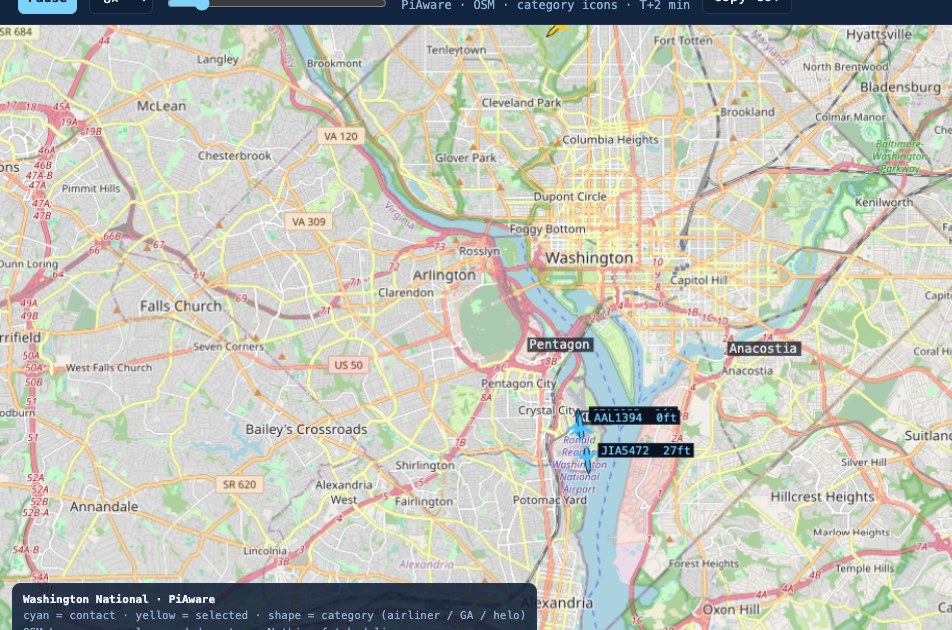
Real PiAware ADS-B over an OSM basemap around KDCA. Category icons for airliner, GA, and helo.

The wire, not a plugin

A native ATAK plugin needs a TAK.gov SDK account with manual approval. Cursor-on-Target needs a socket. The useful half of this tool is the second one. A tablet that has never seen this site still draws a friendly air contact if the event is well-formed.

The preview shows that event in the open, so you can read what would have been sent: a-f-A, callsign, course in degrees, speed in metres per second, height above ellipsoid. The desktop tool emits that for every contact the receiver reports and keeps doing so until you stop it.

How the preview works

This page is a recorded export, not a live home feed. The contacts are already in the HTML. Your browser plays them. Nothing is fetched. No aggregator. No socket back to a receiver.

Callsigns here are from the PiAware capture. Treat it as a worked example of the playback file, not yesterday's real picture. A public page that opened a live ADS-B aggregator would need an account and would log every visitor's interest in a stretch of airspace.

Fresher copies replace this file the same way it was made. Capture a window. Export. Put the page on the site. The public site never talks to the receiver.

Receiver, capture, export, page

That is the whole model.

  1. A USB ADS-B stick hears the 1090 MHz broadcasts.
  2. Capture writes the traffic.
  3. Export bakes the capture window into a self-contained HTML playback.
  4. The site serves that file.

The desktop tool does the other half on a machine you control: decode, and push Cursor-on-Target onto a TAK network. That half stays off the public page on purpose.

Gear

The stick is a FlightAware Pro Stick Plus. The box it plugs into is a PiAware build. Coverage is whatever the antenna can hear; the large outdoor one is the 1090 MHz FlightAware antenna. USB in. It talks. The story on this page is the recorded hour, not the box, and not a live picture from home.

What the preview leaves out

A live dump1090, ICAO-to-registration lookup, history longer than an hour, and the socket that actually talks to ATAK. AIS Watch is the same idea on the water. Camera Map is the ground picture along the same river.

Looking for the code?

It is not published. These are personal builds, and what is here is the write-up rather than the repository.

The browser version is here, running the same work on your own machine: try it.

If you want to read the source or run the full desktop tool, ask. Say what you are doing with it and I will usually send it over.

Ask for the code

Comments

Plain text only. Held for review before it appears.